Reconcile Bank Lines
Review every imported bank line with its proposal, confirm the right ones in one go, and book the rest.
Finance → Reconciliation lists every bank line still to review, with one proposal each. Prospect proposes; a person always confirms.
You need: the Finance permission and the permission to reconcile transactions. Import the lines first under Bank statements.
Review the lines
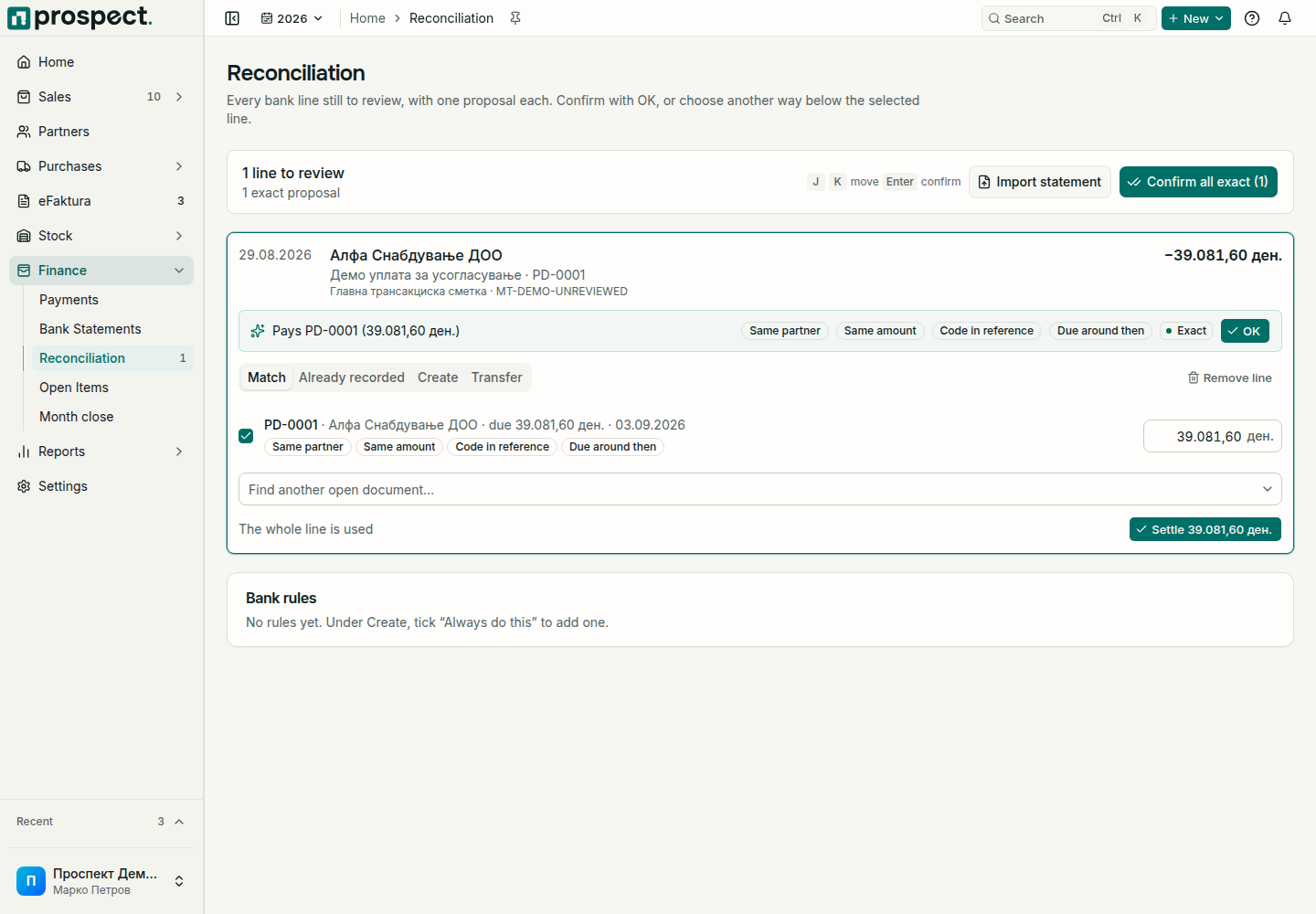
Open Finance → Reconciliation. The top shows how many lines are left and how many proposals are exact. Move between lines with J and K and confirm with Enter.
Read the proposal on the selected line, such as Pays an invoice or supplier document. The chips say why: the same partner, the same amount, the document's code in the bank reference, or a due date around the line's date. Prospect also recognizes the partner by a known bank account, the EDB in the purpose, or the same name.
Choose OK when the proposal is right. Confirm all exact confirms every proposal marked Exact at once.
Book a line another way
The tabs under the selected line offer the other ways:
| Tab | Use it for |
|---|---|
| Match | Tick one or more open documents of the partner, or use Find another open document…. Lower an amount when the line pays only part of a document; when it pays more, keep the rest as the customer's credit or as an advance to the supplier. Then choose Settle. |
| Already recorded | The payment was already entered by hand. Choose This is it so the money is counted once. |
| Create | A line that pays no document, such as a bank fee, an expense, tax, or an advance. Tick Always do this for lines containing to turn the choice into a bank rule. |
| Transfer | Money moved between your own accounts. Book as own transfer links it to the other account's line when that statement is imported. |
Remove line deletes a line that was imported by mistake; if it was the statement's last line, the statement goes too, so the right file can be imported again.
Bank rules and recent lines
Bank rules lists the rules you created and how often each was used. A rule only proposes; each line is still booked when you confirm it. Reviewed lately lists the lines you just booked; Unmatch brings one back for review.
Good to know
- Whether an overpayment can stay as credit on the partner, and whether supplier advances are allowed, is set under Settings → Workflow Policy.
- A settlement cannot exceed the bank line or the open item's remaining balance.
- A line dated in a locked fiscal year or a closed month needs the period reopened or an authorized override.
- Never delete or recreate an invoice or supplier document only to change a bank match. Use Unmatch, or reverse the payment under Payments.